The first time I asked the new ChatGPT app to fix something, I still expected an explanation. I typed my request, then sat there like I was waiting on a reply. Nothing came for a minute. Then I looked at my folder and found the cleaned-up file waiting for me.
That gap between what I expected and what happened is the whole reason I made this course.
The mental-model flip
For a couple of years, ChatGPT was a place you went to get answers. You asked a question, it wrote something back, and then you did the actual work yourself. Copy the code into your editor. Paste the summary into your doc. Rename the files by hand. The app talked; you did.
The app can do more than answer now. In Codex mode, it can open files in a folder you choose, read them, change them, and run commands within the access you grant. So the thing you ask for changes too. You can ask for a result, let Codex carry out the task, and review what comes back.
I know that sounds like a small difference. "Explain how to clean up this file" and "clean up this file" produce two completely different afternoons.
The three parts worth recognizing
Three parts underneath every agent are worth knowing. Name them, and you will have a practical way to understand why a result came out the way it did.
Instructions it follows. This is what you tell it to do, plus any standing rules you have set. When a result disappoints you, the instructions are usually the first thing to check. Missing detail in the request often shows up as missing detail in the result.
Context you give it. This is the material it works from. The file, the folder, the notes, the examples. Specific context grounds the work in your actual stuff. Its quality shapes the result, and we spend all of Module 2 on it.
Tools it can use. This is what it is allowed to touch. Reading a file is a tool. Editing a file is a tool. Running a command is a tool. Local reach depends on the folder, permission profile, and approval settings you choose. Apps, the browser, Computer Use, and cloud work have separate controls.
That is the mechanism. Instructions, context, tools. Everything else in this course is just those three, turned up.
Where Codex sits in the app
Inside the ChatGPT desktop app, you pick a mode for each task. There is a small picker with three options: Chat, Work, and Codex.
Chat is the conversation you already know. Work is a mode for longer research and document jobs. Codex is the one we care about here. It is OpenAI's coding agent, and it is the part that reads and edits files in a folder you choose and runs commands like tests or cleanups.
One thing to get straight now, because it trips people up: Codex is one mode inside the ChatGPT desktop app. The old standalone Codex app got folded into it. So when I say "open Codex," I mean pick Codex from that mode picker.
Get the app open before you keep reading
If the app is already open in front of you, skip to the next section. If it is not, do this now:
- Open OpenAI's desktop app quickstart and choose the download for macOS or Windows.
- Install the app, open it, and sign in with your ChatGPT account.
- Select New task.
- Choose where Codex should work, then open one small folder you are comfortable letting it read. An empty folder is fine for now.
- Open the mode picker and choose Codex.
Leave that task open. You do not need to type anything yet. The next lesson sets the model and permissions, and the lesson after that gives you the exact first task.
What you are looking at
The left side keeps your projects and tasks. The middle is the running conversation and activity log. The right side is where you can inspect files and changes. The composer sits along the bottom, with the model and permission controls nearby.
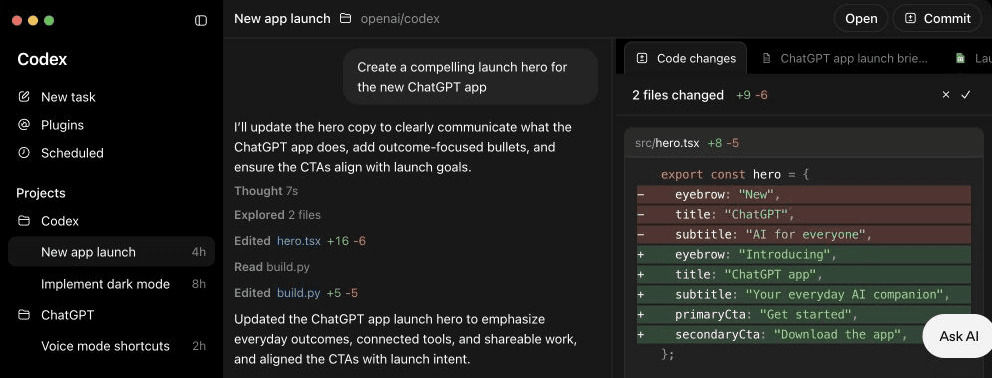
Official OpenAI product view captured from the ChatGPT desktop app guide. The interface may move, but these four jobs stay recognizable: choose the task, describe the result, watch the work, and inspect what changed.
What this course does
Here is my promise, and the limit on it.
I will get you comfortable handing a real task to Codex, watching it work, and deciding whether the result is good. You will brief it, supervise it, and check its work like a manager checks a new hire. By the end you will have built a few things you actually keep using.
This course keeps your review on the outcome. You can leave the code to Codex. When it changes a file, we open the result and check whether it does the job. If a lesson ever seems to drift toward "and now inspect the code," I have failed my own rule, and you should email me about it.
You are the manager. Codex is the one who types. That division holds for the entire course.
Next lesson, we meet Codex properly: what it is allowed to touch, which model to pick without drowning in names, and why you keep it on a short leash at first.